
Features

How ONA.UNO turns your saved knowledge into a useful, searchable knowledge base.

Captured items in the ONA.UNO timeline

Capture

Capture From Everywhere (Without Changing Your Workflow)

ONA.UNO brings your information into a single timeline without moving your originals.

  • Files and folders index documents where they already live: text, Markdown, PDFs, images, and HTML.

  • Browser clips for Chrome, Chromium, and Safari save any page in one click or shortcut, convert it to clean Markdown, and deduplicate by canonical URL.

  • Apple Mail indexes your local archive without OAuth, with account and date-range controls.

  • Obsidian vaults come in Markdown-first, with frontmatter support and deep links back to obsidian://.

  • Feedbin stars import full text and stay in sync.

Everything lands in one place: a chronological timeline you can browse by day, tag, or source.
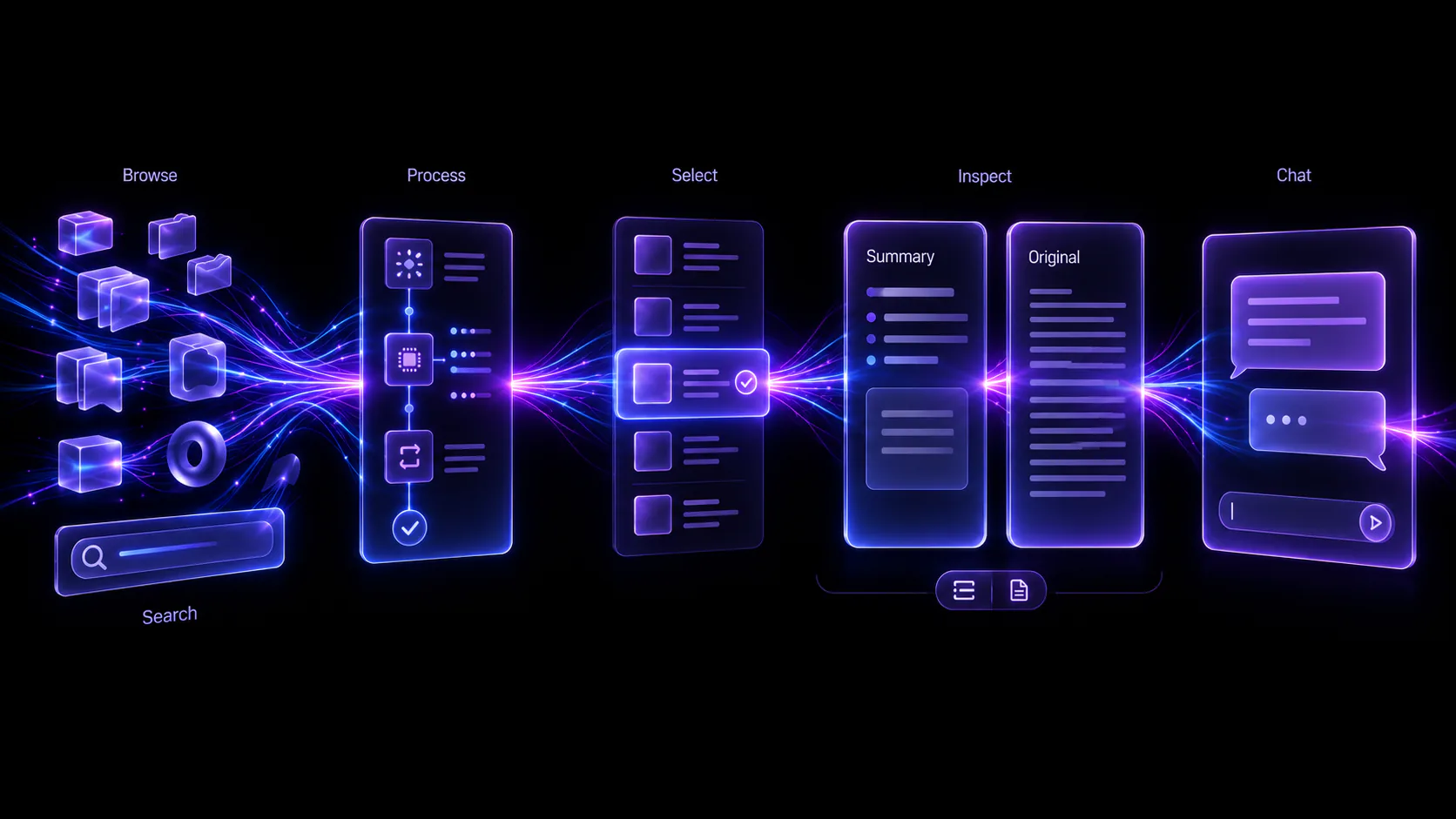
AI pipeline processing stages in ONA.UNO

Enrichment

A Sophisticated AI Pipeline (That Runs Automatically)

Every item that enters ONA.UNO is enriched in the background.

  • Clean extraction for HTML, PDFs, scanned PDFs, and images.

  • YouTube transcripts when you clip videos, so spoken content becomes searchable.

  • Chunking and embeddings so meaning, not just keywords, becomes searchable.

  • Micro summaries for fast scanning.

  • AI titles and AI tags generated from the content itself.

The result is simple: you stop filing things by hand, and your knowledge organizes itself.

Micro and long summaries in ONA.UNO

Understanding

Summaries At Every Level

Scan fast when you’re busy. Go deep when you need detail.

  • Micro summaries are generated automatically for every item.

  • Long summaries can be generated on demand for a single item, a day, or a daypart.

  • Citations let you trace every important claim back to the source.

Search filters and query language in ONA.UNO

Retrieval

Search That Actually Finds Things

ONA.UNO is built for libraries with thousands, or tens of thousands, of items.

Choose the right tool for the job.

  • Titles when you remember the name, including AI-generated titles.

  • Titles, tags, and summaries when you want the important fields fast.

  • Titles, tags, and full content when you need exhaustive search.

  • Semantic search for “what was that thing about…” moments.

Chat answers with citations in ONA.UNO

Reasoning

Chat With All Your Knowledge (With Citations)

Sometimes you don’t want to browse. You want to ask.

  • Chat with all items in your library.

  • Focus the scope to a selection, day, daypart, tag, or current search results.

  • Citations by default with clickable [#] references back to the source.

  • Open original jumps from a citation into Obsidian, Finder, Mail, or the web.

  • Saved chat history keeps conversations reloadable and renameable.

This is not a generic chatbot. It is grounded in your sources.

Two AI Modes

Choose the balance of quality, cost, and locality that fits your setup

ONA.UNO gives you a clear choice depending on your hardware, cost profile, and privacy preferences.

Online mode configuration for ONA.UNO

Two AI Modes

Online Mode (Best Quality, Fastest Bulk Imports)

Online mode runs the full pipeline via OpenRouter.

  • Best-of-class embeddings and pipeline models such as Qwen3 Embedding 8B and Gemini 2.5 Flash Lite.

  • Parallel processing for faster initial indexing.

  • Optimized for Apple Silicon Macs.

Mixed mode setup and local model usage in ONA.UNO

Mixed Mode (Cost-Effective, More On-Device)

Mixed mode runs high-volume pipeline stages locally while still using the best remote models where they matter.

  • Local embeddings, micro summaries, titles, and tags for lower ongoing cost.

  • Remote chat and long summaries when you want the strongest answers.

  • Great for offline pipeline work and more cost-sensitive setups.

In both modes, ONA.UNO tracks remote spend so there are no surprises.

Integrations

Extensions and integrations that disappear into your workflow

ONA.UNO is built to meet you where you already work instead of forcing another system on top.

Chrome and Safari browser clipper for ONA.UNO

Integrations

Chrome + Safari Clipper

  • One click, shortcut, or context menu to save into ONA.UNO.

  • Clean Markdown extraction with strong readability conversion.

  • Offline queueing so clipped items import automatically when ONA.UNO is running.

  • Smart deduplication by canonical URL.

  • Markdown export and import for transfer and backup workflows.

Obsidian companion plugin actions in ONA.UNO

Obsidian Companion Plugin

Optional, but powerful.

  • Open in ONA.UNO App from the current note.

  • Chat in ONA.UNO App about the current note.

  • Status indicators show whether ONA.UNO can currently see your vault.

  • Everything runs locally, with no network required.

Raycast extension commands for ONA.UNO

Raycast Extension

Fast access without changing contexts.

  • Search Items with live preview and quick open actions.

  • Recent Items and Recent Starred Items for fast re-entry.

  • Clip Item to send a URL into ONA.UNO from anywhere.

  • Chat with All Items and Daily Summary commands.

  • Local and Remote connection modes for desktop and Tailscale setups.

Server browser access timeline and chat view for ONA.UNO

Server: Browser Access

Open your ONA.UNO library in a browser on another device when that is more convenient than sitting at your Mac.

  • Browse your timeline and open item pages.
  • Run search, including semantic search.
  • Use chat with streaming answers and clickable citations.
  • Clip URLs from mobile when you do not have a browser extension installed.
  • Works well on phones, tablets, laptops, and Raycast remote mode.

Security model: off by default, local-network only when enabled, password protected, with optional remote access via Tailscale.

ONA.UNO server features and connected library views

Use ONA.UNO Inside Claude and Other MCP Apps

If you already work in Claude Desktop, Cursor, Codex, or another MCP-capable client, ONA.UNO becomes part of that workspace instead of asking you to switch tools.

  • Use Claude to search, read, and chat across the Set currently selected in ONA.UNO.

  • Let Claude turn what it finds into structured output in tools like Notion, Workflowy, Heptabase, or Tana.

  • Setup stays simple: copy the generated MCP config from Settings → Server and paste it into your MCP client.

  • ChatGPT is out of scope because it requires a remote HTTP/OAuth integration instead of a local MCP connection.

Native macOS timeline performance in ONA.UNO

Performance

Native macOS Performance

ONA.UNO is a native macOS app built for large libraries.

  • Smooth scrolling and responsive UI even with thousands of items.
  • Search designed to stay fast and deliberate instead of bogging down into sluggish live filtering.

  • Background processing that does not block your work.

Your data, your control

  • Your originals stay where they are. ONA.UNO indexes them instead of taking them over.

  • There is no ONA.UNO server that stores your content.

  • Cloud AI usage is bring your own key via OpenRouter, with spending limits you control.

  • Your content goes directly from your Mac to the provider over encrypted connections. We never see it.